Running a Club Championship
A club championship may include many separate titles: Open Singles, Women's Singles, age groups, grades, doubles, and mixed doubles. Players experience it as one championship, even though each event needs its own entrants, draw, schedule, and winner.
ServeLeague models that structure as one tournament containing several events. An event can also contain more than one division when its entrants need separate draws. This guide focuses on the decisions that make a multi-event championship work well. For the complete screen-by-screen tournament workflow, read Running a Tournament.
Before You Begin
Complete the following preparation before creating the championship:
- Set up your club and add the players who are likely to enter.
- Decide which championship titles you will offer.
- Choose the playing date for each event.
- Decide whether each event needs one draw or several divisions.
- Agree on entry fees, closing dates, and any eligibility rules your club will enforce.
[!IMPORTANT] There is no separate Championship competition type. Choose "Tournament" when creating the competition. A one-event open and a multi-event club championship use the same structure.
Step 1: Create One Tournament for the Whole Championship
From your club administration area, open "Leagues" and click "New League". Choose "Tournament", enter the championship name, and create it.
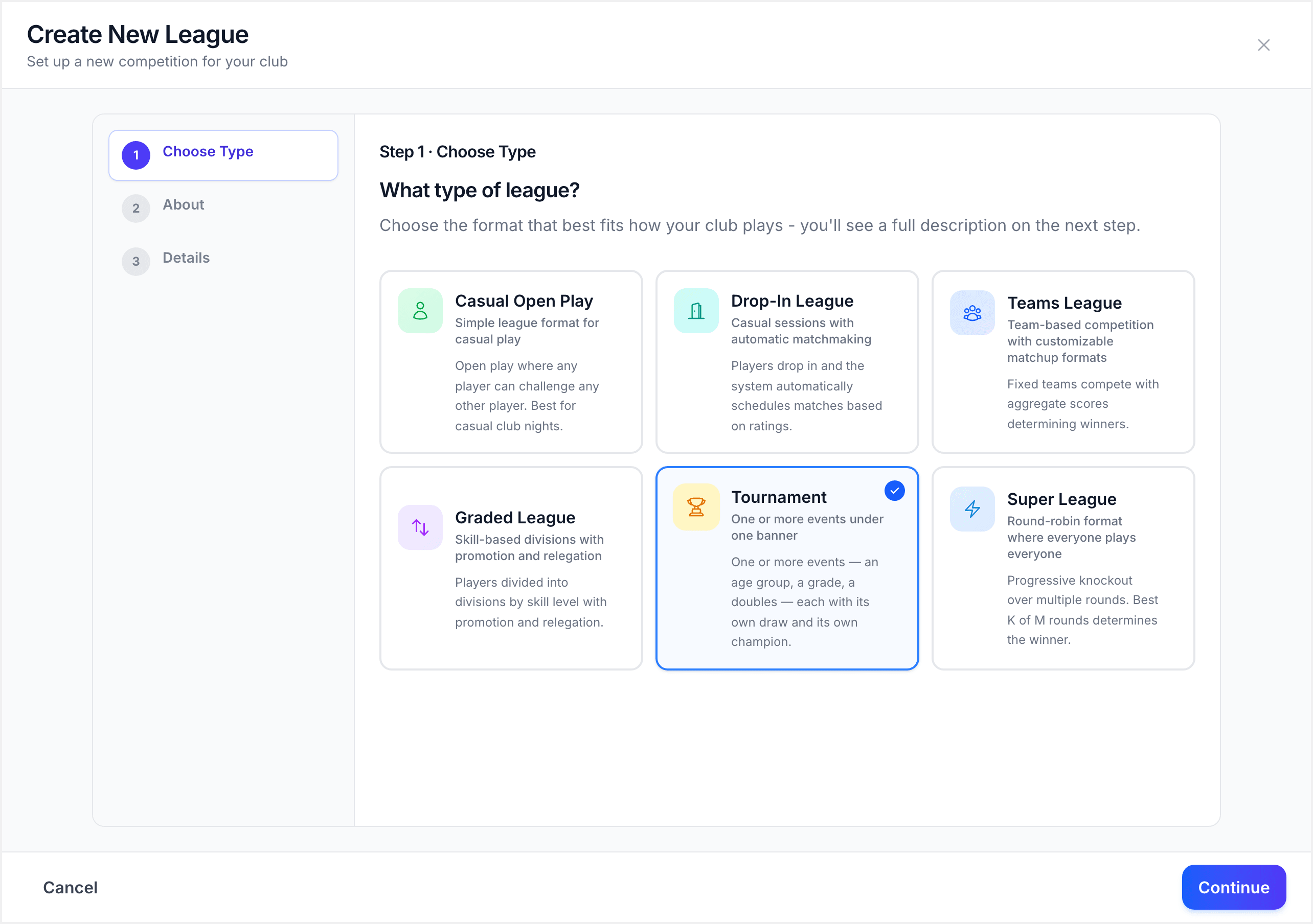
Use the name members already recognise, such as "Riverside Club Championships 2026". Do not create a separate tournament for every title. Keeping the events inside one tournament gives players one place to find the programme, registration, live draws, and results.
The tournament opens on its "Setup" tab. Confirm the "Tournament Rules" defaults before adding events. These defaults give new events a sensible starting point, but each event or division can use different rules when needed.
[!TIP] Set defaults for the format used by most events. Override the exceptions later, rather than configuring every event from scratch.
Step 2: Turn Each Championship Title into an Event
Click "Add event" for every title the club will award. Examples include:
- Open Singles
- Women's Singles
- Open Doubles
- Mixed Doubles
- Under 19 Singles
- Over 40 Singles
- A Grade Singles
- Novice Singles
An event is a competition with its own entrants and champion. A division is an additional draw within that event. For example, "Under 19 Singles" should normally be one event. If entry numbers require two ability groups, add Division A and Division B inside that event instead of creating two unrelated events.
For each event, check its name, match type, category, scheduled date, entry price, and draw format. Categories help members scan a large programme, while scheduled dates make it clear which events are played together.
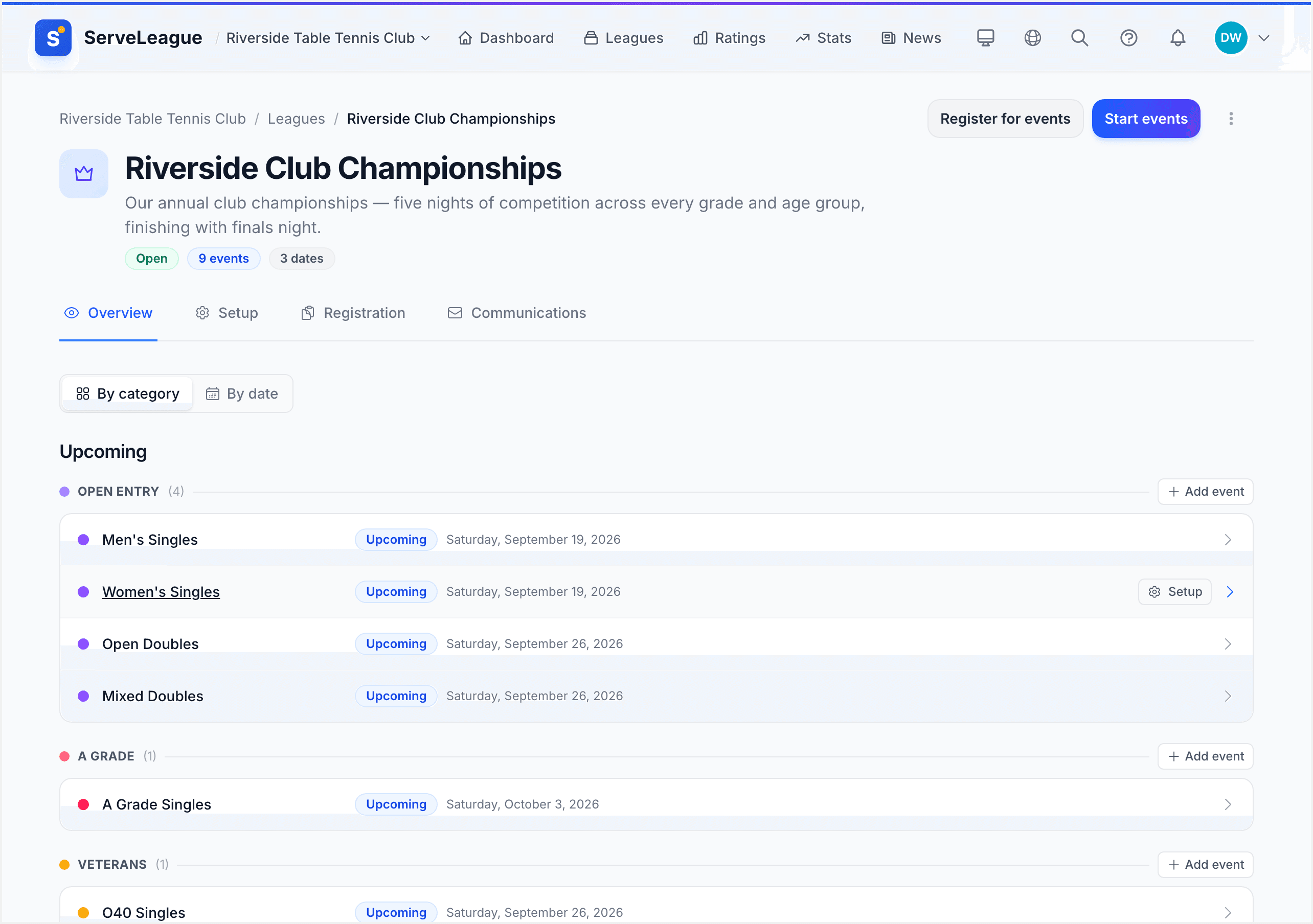
At this point, review the programme as a member would:
- Can somebody quickly find the events they are eligible for?
- Are similarly named events clearly distinguishable?
- Does every event have the correct playing date?
- Is it clear which events are singles, doubles, or mixed doubles?
- Have divisions been used only where one event genuinely needs multiple draws?
[!NOTE] The event name should describe the title being contested. Use divisions for draw splits such as Division A and Division B.
Step 3: Check Capacity Before Opening Entries
Before inviting players, estimate whether the programme fits the available tables and time. The number of entrants is only one part of the calculation. The draw format and match length determine how many matches an event creates.
For each playing night, check:
- How many tables are available?
- Which events share those tables?
- How long is each match expected to take?
- Does the draw guarantee enough matches without making the night too long?
- Which events can continue on another date if necessary?
Use "Group + Knockout" when players should receive several matches before elimination. Use "Round Robin" for smaller fields where everyone can play everyone. Use "Full Placement" for a 16-player event where every entrant needs a final position.
The detailed format descriptions and division setup steps are covered in Running a Tournament.
Step 4: Open One Entry Experience
Publish the tournament and open registration when the programme is ready. Players open one championship entry page and choose the events they want to enter.
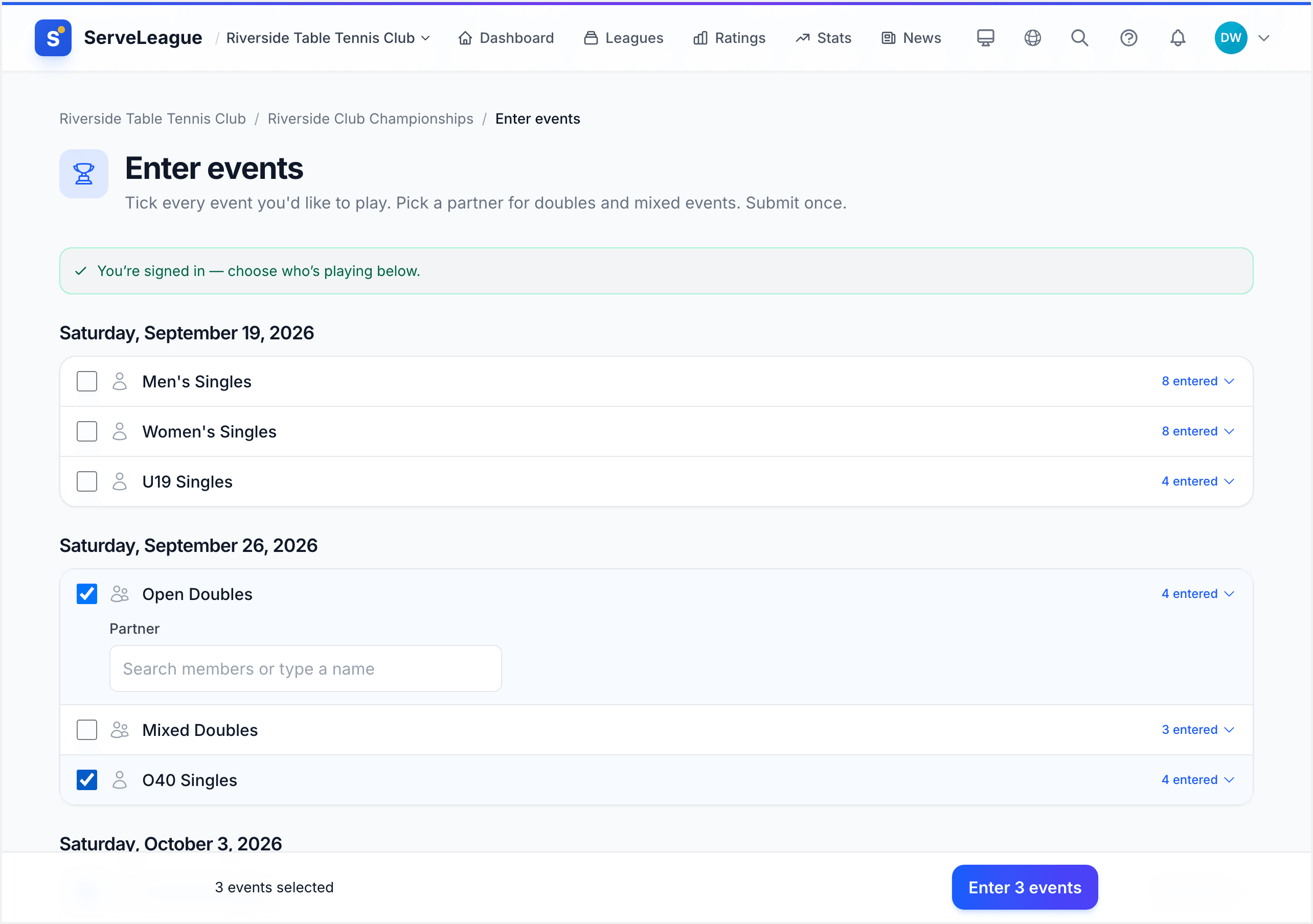
Before sharing the entry page, test it with a member account linked to a player profile. Confirm that:
- Every intended event appears.
- Event names and playing dates are understandable.
- Singles and doubles events are clearly identified.
- Prices and closing dates are correct.
- A player can review all selected events before completing their entry.
Review registrations regularly rather than waiting until closing day. This gives you time to respond when an event is nearly full, has too few entrants, or needs an additional division.
[!TIP] Ask members to report a missing or incorrect event before registration closes. Correcting the programme is much easier before draws are generated.
Step 5: Finalise Entrants and Build the Draws
After registration closes, review each event separately. Resolve withdrawals, waiting-list places, doubles partnerships, and eligibility questions before building its draw.
Then open each event and use its division setup flow to:
- Confirm the draw format.
- Confirm match rules and table allocation.
- Add or review the players.
- Check the generated match count and estimated duration.
- Create the draw when the event is ready.
Do not generate every draw merely because registration has closed. Generate a draw only after its entrants and structure have been checked. This avoids resetting a draw because of a late correction.
Step 6: Run the Championship One Playing Night at a Time
On each playing night, open the tournament's live view and start the events scheduled for that date. The tournament remains the shared programme, while each event keeps its own draw and progress.
Give score-entry access only to the people running the event. As results are entered, check that the correct players and scores appear before the next stage is generated. For group-based formats, review the completed group standings before starting the knockout bracket.
If an event cannot finish, leave the unfinished matches in place and resume them on the agreed date. Avoid changing unrelated events to accommodate one delayed draw.
[!WARNING] Check group results and qualifiers before starting a knockout bracket. Correcting an earlier result after later-round matches have been played can require the affected bracket to be rebuilt.
Step 7: Review and Publish the Results
When an event finishes, review its final match, placement order, and champion. Complete the event's result workflow only after any score questions have been resolved.
At the end of the championship, check the public tournament page from top to bottom:
- Every event shows the expected status.
- Completed draws show their final results.
- Champions and placements belong to the correct events and divisions.
- No event remains open accidentally.
- The page provides a clear permanent record for members.
Share the single tournament page with members rather than circulating separate links for every draw.
One Event or Many?
You do not need to predict the final size of the competition when you create it:
- With one event, the tournament stays focused on that event and its draw.
- With several events, the same tournament becomes a championship programme.
- If an event needs multiple draws, add divisions inside that event.
That means a successful one-day open can grow into next year's club championship without changing competition types or rebuilding the underlying structure.
What's Next
Your championship now has one tournament, clearly named events, appropriate divisions, one entry experience, and a controlled process for each playing night.
- Running a Tournament covers every setup screen and draw format in detail.
- Score Entry and Match Management explains how to record and correct results.
- PDF Exports and Match Sheets covers printed material for the control desk.